Create a LinkedIn badge: an announcement for the post and proof for the profile
A LinkedIn badge can mean two things. One is the shareable image your speakers and guests use to announce that they're taking part. The other is the proof people add to their profile after the event. With OneClickBadge you get both in one place, in the look of your event.

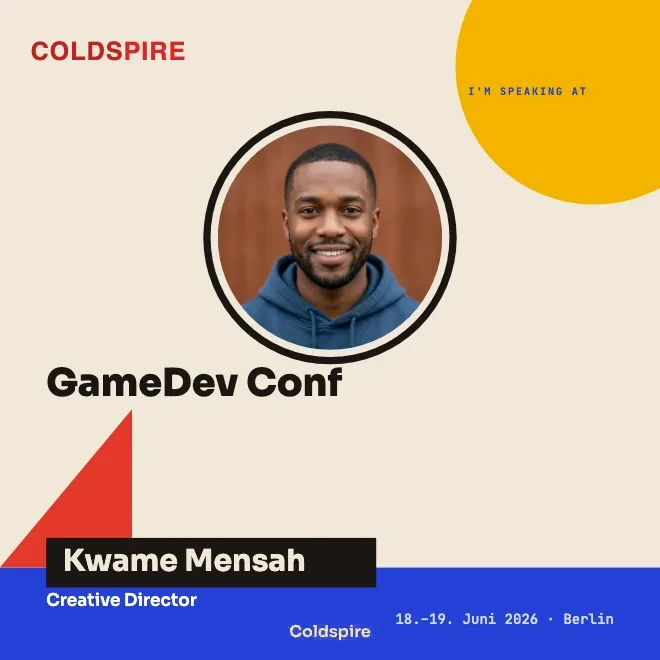
Two things people call a LinkedIn badge
The term carries two meanings, and that often causes confusion. Sometimes people mean one thing, sometimes the other.
The first is an image for a post. You design a graphic in the look of your event, with your logo, title and date. Your speakers and guests add their photo and name and share the image in their feed. That is how they say they're taking part.
The second is an entry on the profile. After the event you issue an attendance certificate, and people add it with one click to the Licenses & certifications section, where it stays for good.
OneClickBadge covers both meanings, so you don't have to choose between two tools.
How you create your badge
In practice it comes down to three steps.
First, the design. Start with a template and customize the logo, colors and text. Set the format in the editor: 1:1, 4:5, 9:16 or 16:9. Guests download the format you have prepared.
Second, the link. You share one link with your speakers and guests. Each person adds their own photo and name. You don't have to rebuild anything per person, and no one has to sign in.
Third, the certificate. After the event, create a certificate type in the dashboard and share its redemption link. The certificate guide covers setup, name entry and the personal verification URL.
The video walks through the first two steps with a sample event: choosing a template, setting the logo and colors, deciding which fields your guests fill in themselves, and sharing the link. It also covers the difference between the guest link and your administration link.
The badge for the announcement
Before an event, hardly anyone talks about it. That is where the shareable badge comes in. Everyone who speaks or attends makes the event visible.
You build the badge in your event's design, once. Then you send your speakers and guests a link. They open it, drop in their photo and type their name, with no account needed. They post the result on LinkedIn.
For the stage there is the speaker badge, which puts the talk front and center. For everyone who is simply attending, a “We're attending” template fits. Both build on the same design, so the posts belong together even when many different people share them.
The reach happens out in the networks of the people who take part, away from your own channel. A speaker with a large network reaches people who would never see your own page. A separate guide explains why a personal post gets more attention in the feed there.
The proof for the profile
After a good event, people want to show they were there. For that you issue an attendance certificate. Attendees open it through a link and get their own permanent page. From there they add it to their profile on LinkedIn with one click, in the Licenses & certifications section. That is the same spot where a course certificate sits.
What matters is what this certificate is and what it isn't. It is confirmation from you as the organizer that someone took part. The common industry term for it is a certificate of attendance. LinkedIn only provides the feature and the space on the profile.
Under the hood it is the Open Badges 2.0 standard in its hosted form. That means every credential lives at a fixed web address and can be verified there. It works with as little personal data as possible, and you can revoke it if something is ever off.
Why both from one place
There are tools for building beautiful graphics. And there are providers that issue digital credentials. Rarely can you do both in the same place, in the same look.
A design-only program hands you an image. What comes next, getting it to the people taking part and onto their profile, you have to sort out yourself. A credential-only provider takes care of the technology behind the certificate, yet the announcement image before the event is missing.
With OneClickBadge the two fit together. The badge for the announcement and the proof for the profile carry the same design, the people taking part need no account for either step, and you manage your event in one place.
They make a graphic, but no proof for the profile.
Announcement and proof from one place, in the same look.
Before the event and after
It is best to think of both moments together. Before the event, the shareable badge gets speakers and guests to carry the event into their networks. It costs you nothing in ads and comes across as more credible than advertising, because real people stand behind it with their name.
After the event, the attendance certificate closes the loop. A day that would otherwise be over becomes an entry that stays on the profile of the people who took part, names your event again and again, and catches the eye of everyone who looks at that profile.
If you want to know how to set up your first event, the onboarding walks you through it step by step. From there it is a short way to the first badge someone shares.
What you can customize in the editor
Adjust typography and photos, use gradients, shapes and vector decorations, or try text looks and effects. Multi-selection and alignment help organize the layout. Mark the text fields guests may fill in themselves.
For different roles or formats, offer several prepared badges through one link. With an account, you can also customize guest pages and link previews and use the roadmap in the dashboard.
The guide Customize your event shows how to tailor the page behind your link and its preview in chats to your event.
All features in the full tutorial
If you want to go deeper, a longer video covers the whole process: creating the event, designing badges, sending out links, downloading animated badges, issuing attendance certificates and setting up the brand kit for future events. To get started, the short video above is enough.
Related
Frequently asked questions
- Is OneClickBadge free?
- For your speakers, guests and attendees it is always free, and they need no account. As the organizer you create your event and design your badge in full before you commit. You issue attendance certificates with a free account. Anything beyond that for your event is shown openly when you set it up.
- Do your speakers and guests need an account?
- Speakers and guests need no OneClickBadge account. You can also create basic badges without an account and manage them through your administration link. An account adds customization options and standard certificate setup. The dashboard guide explains these features.
- Which formats are there?
- For badges, choose square (1:1), portrait (4:5), story (9:16) or landscape (16:9) in the editor. Certificates offer A4 landscape, A4 portrait and square, together with their own verification page.
- What is the difference between the announcement and the certificate?
- The announcement is an image before the event. Your speakers and guests share it to draw attention, and the reach comes from their networks. The certificate comes after the event. It is confirmation from you that someone took part, technically a hosted Open Badges 2.0 credential, and it stays on the profile for good.