Announce your event on LinkedIn
The first post decides whether your event lands on people's radar or slips by unnoticed. This page gives you a template for the announcement to copy, tells you when it works best to post it, and shows how a shareable badge turns one post into many.
The save-the-date template
The first post can be plain. Its job is to set the date, nothing more. Replace the bracketed parts with your own details:
Save the date: [EVENT NAME] on [DATE] in [LOCATION].

[One sentence on what it's about and who it's worth attending for.]

Program and registration to follow shortly. If you already know
you want to be there, RSVP here: [LINK TO THE EVENT]

#[EVENT HASHTAG] #[INDUSTRY]
Choose the link to match your goal. If an RSVP on LinkedIn is enough for you, link to your LinkedIn event listing and write “RSVP on LinkedIn”. There the RSVPs gather in one place, and LinkedIn reminds those attendees of the date on its own. If you need a ticket or a binding registration instead, link straight to your registration page and write “Reserve your spot”. An RSVP on LinkedIn does not replace that registration.
Name, date and link are quickly filled in. Where people get stuck longest is the middle sentence, the benefit. A formula helps: [AUDIENCE] comes together to achieve [GOAL], with [FORMAT OR CONCRETE BENEFIT]. Filled in, that reads something like this: “The B2B Growth Summit brings together marketing and sales teams who want to make their pipeline more predictable. The focus is on hands-on sessions with ready-made playbooks to take away.”
If you have prepared several designs, link the shared badge selection in your announcement. Save its suggested post text in the dashboard.
What a good announcement post does
An event announcement on LinkedIn has one job: to tell the right professionals early enough what is happening, when and for whom, that they remember the date and find the sign-up. Everything else is decoration.
For that to work, four things belong in every announcement post: the name of the event, the date, one sentence on the benefit for the audience, and a clear next step with a link. An image that makes attendance visible lifts the post out of the wall of text.
When to post the announcement
Too early and there is nothing concrete to say, too late and there is no time for reach to build. For the announcement itself, this rhythm has proven itself:
| Timing | Post | What matters |
|---|---|---|
| Around 6 weeks out | Save the date | Just date and topic, with a link to the listing |
| 3 to 4 weeks out | Show program and speakers | One speaker or program item per post, not all at once |
| Final week | Countdown | One reason a day to register now |
A badge turns one post into many
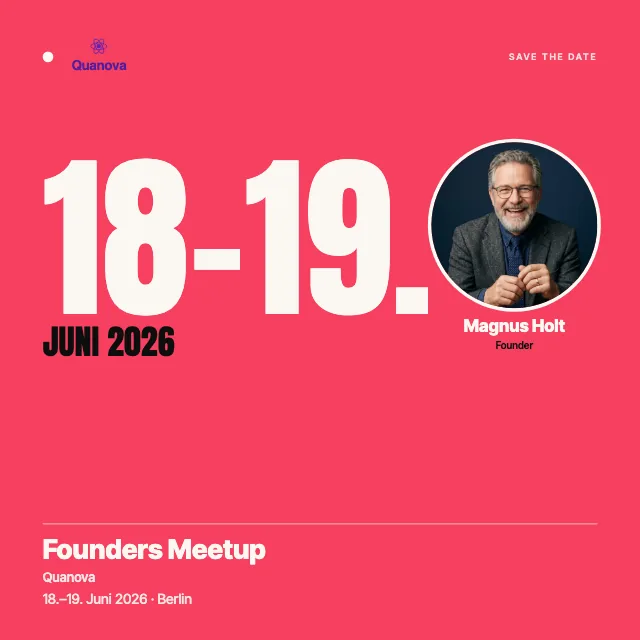
A post from your page reaches mainly your own followers. The announcement gets much further when your speakers, partners and guests carry it into their networks. For that, each of these people needs something ready-made that can be posted in minutes.
That is exactly what a badge in the look of your event is. You design one badge, share a link, and your people add photo and name and post their own image, with no account and no design work. For speakers there is the “I'm speaking” template, and for booth teams and partners the “We're attending” template.


From save-the-date to countdown
In the last week before the event you turn up the pace. A short countdown post each day keeps the event present in the feed and gives the undecided one last nudge:
Only [X] days until [EVENT NAME].

What I'm looking forward to most: [a concrete program item,
a speaker or a format].

Not signed up yet? Register here: [LINK TO THE EVENT]
You will find the full plan with all seven posts, from the announcement to after the event, in the guide to promoting your event.
Related
Frequently asked questions
- How often can we post before the event without being annoying?
- About one post a week from your own channel is enough, and in the final week a short daily countdown is welcome. More important than the number is the variety: a speaker one time, a program item another, a look behind the scenes another. When every post brings something new, even frequent posting doesn't feel pushy.
- Should we announce from the company page or from personal profiles?
- From both. The company page carries the official announcement, and the team's personal profiles carry it further, because personal posts reach more people. What helps most is when speakers and partners post their attendance themselves.
- Does the announcement need an image?
- It works without one, but then it gives away reach. A post with an image stands out more in the feed, and a badge in the event look shows name and date at a glance. The second advantage: your guests can post the same badge themselves.
- What do we write when the program isn't set yet?
- That is exactly what the save-the-date is for. It needs only the date, the place and a topic. You add the program and speakers in the weeks after, which gives you occasions for more posts all on its own.